
Sewpal: Sewing Pattern & Guide
PIXELCELL PTE. LIMITEDLifestyle
4.863.00 Reviews
- Version
- 1.0.0
- Installs
- 10.00K
- Age Rating
- Everyone
Screenshots
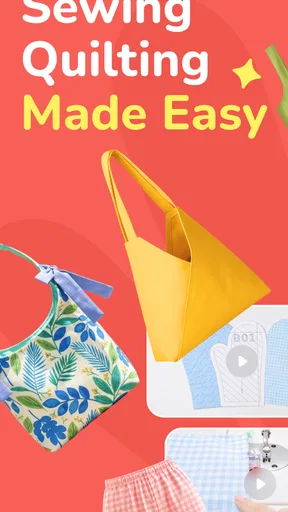
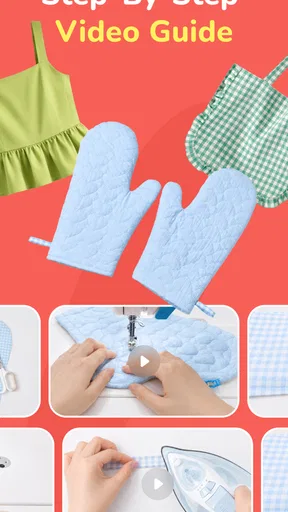
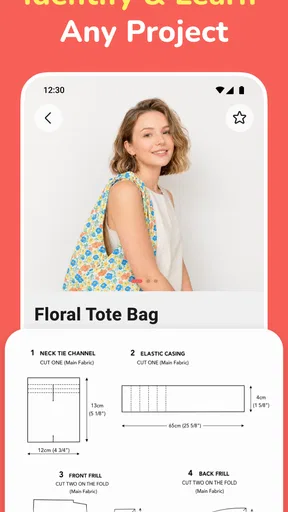
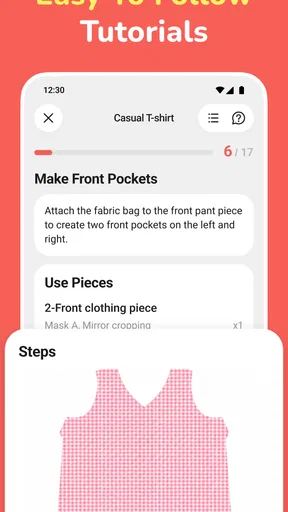
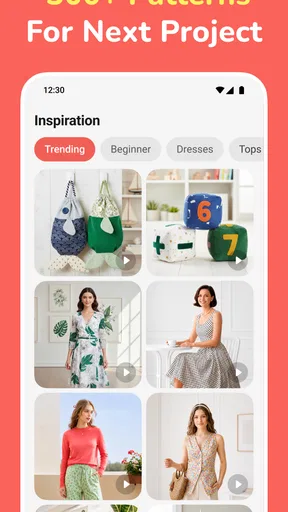
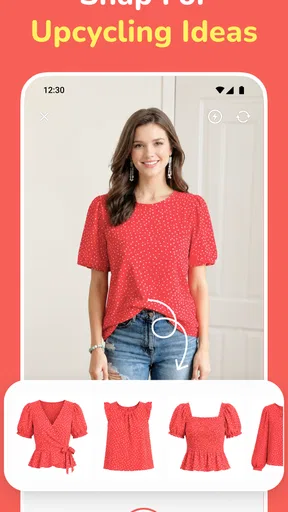
Our Review of Sewpal: Sewing Pattern & Guide
 Analysis by Appyee
I approached Sewpal: Sewing Pattern & Guide as a practical companion for the moment when a sewing idea needs to become an actual project. Its central promise is simple: it brings patterns and step-by-step guidance together so I do not have to jump constantly between a vague idea, scattered notes, and unrelated tutorials. That focus makes it more interesting than a general lifestyle app, because the value depends on whether the guidance helps me move from “I want to sew that” to “I know what to do next.”
Developed by PIXELCELL PTE. LIMITED, this free lifestyle app is aimed at people who want sewing help in a more organized form. It is available for users aged Everyone, and the current release is version 1.0.0 for devices running Android 9 or later. The app has attracted over 10 thousand installs, with an average rating of 4.8 from around 1.8 thousand ratings. Those figures suggest that its focused approach has appealed to a growing group, although I would still judge it by how well it fits my own sewing habits rather than by the rating alone.
Turning a sewing idea into a sequence of manageable steps
The capability that matters most here is the combination of sewing patterns and guided instructions. A pattern by itself can be useful, but it can also leave a beginner wondering about order, preparation, or what a particular stage is meant to achieve. A tutorial by itself may explain a technique without giving me a complete project to work toward. Sewpal is built around connecting those two parts.
In my experience, that changes the mental workload. Instead of treating a project as one large task, I can approach it as a series of smaller decisions: understand the design, prepare what is needed, follow the next instruction, and check my progress before continuing. That is especially helpful when I am sewing after work or during a short weekend session, when I want clear direction rather than a long search through unrelated videos and posts.
The app’s strongest idea is not merely that it contains sewing content. It is that the pattern gives the project a destination while the step-by-step format gives me a route. The useful part is the connection between planning and action. If I already know exactly how to make a particular garment or item, the app may feel unnecessary. If I often save attractive sewing ideas but hesitate when it is time to begin, this is where it can earn its place.
What the guided format changes for beginners
For someone learning to sew, the first difficulty is often not holding the fabric or operating the machine. It is knowing what should happen first and what can safely wait. A structured guide can reduce that uncertainty. I can use each step as a checkpoint instead of trying to remember an entire tutorial at once.
That makes Sewpal more approachable than a loose collection of social posts. Social platforms are excellent for inspiration, but they frequently mix finished projects, short demonstrations, opinions, and incomplete explanations. A conventional search engine can find almost anything, but I have to decide which source is trustworthy and piece the process together myself. The app’s focused format is better suited to a person who wants to stay with one project rather than browse indefinitely.
There is also a useful difference between reading a pattern and watching a quick technique clip. A pattern encourages me to think about the project as a whole, while sequential guidance keeps me focused on the immediate task. That combination can prevent a common beginner mistake: starting with an exciting detail before understanding the preparation that makes the detail possible.
Using it during a real sewing session
Imagine that I have a free Saturday afternoon and want to make something for my home rather than simply practice stitches. I open the app, choose a suitable project, and first read through the instructions before touching the fabric. That preview is important. It lets me notice whether the project feels realistic for the time available and whether I understand the order of operations.
I would then prepare my workspace and keep the guide nearby while working. Rather than scrolling through several sources, I can return to the relevant stage when I need to confirm what comes next. If I stop halfway through, the step-based structure also gives me a natural place to resume. I find that more useful than leaving a video paused, especially when I need both hands free or when the phone screen is not directly beside the machine.
A practical tip is to read the entire project once before beginning, even if the app presents the instructions one stage at a time. This helps me spot difficult transitions early and decide whether I should practice on scrap fabric first. Another is to keep a small note beside the workspace for personal adjustments, such as where I changed the order or marked a fitting issue. The guide can provide structure, but my own notes turn a first attempt into a repeatable workflow.
I would also avoid treating a pattern as an automatic guarantee of fit or finish. Sewing involves fabric behavior, machine settings, accuracy, and personal measurements. The app can guide the process, but I still need to check the material, test important seams, and slow down at points where a mistake would be difficult to undo. That is not a weakness unique to this app; it is simply the difference between digital guidance and hands-on sewing judgment.
Where it fits beside familiar alternatives
The usual alternative is a mixture of printed books, standalone pattern sources, video tutorials, and saved social media posts. Each option has a strength. Books are comfortable for long sessions and do not depend on a phone. Video is valuable when I need to see movement, folding, or machine handling. Social platforms provide a huge stream of ideas. Sewpal’s advantage is concentration: it is designed around the relationship between a project pattern and instructions rather than around broad browsing.
That concentration can make it easier to begin, but it may also feel narrower than a large video platform. If I need a highly specific repair technique, a detailed explanation of a particular machine, or a community discussion about fabric behavior, a broader source may still be better. I would use Sewpal for project direction and another resource when I need a specialist demonstration or a second opinion.
There is a further trade-off between digital convenience and physical reference material. A phone is easy to carry and search, but a fabric-covered table is not always the safest place for it. Bright light, thread, scissors, and frequent hand movement can make screen use awkward. I would position the device away from the cutting area, enlarge the text if possible, and read the next stage before returning to the machine. The app works best when it supports my workspace instead of becoming another object I have to protect.
Small workflow choices that make the app more useful
The first useful habit is project triage. Before starting, I would separate projects into three groups: something I can finish in one sitting, something that needs several sessions, and something that is mainly for skill practice. This prevents me from choosing an ambitious project when I only have a short window. The step-by-step format is particularly helpful for the second group because I can stop at a clear boundary instead of rushing to finish.
The second is deliberate preparation. I would gather fabric and tools before beginning, but I would not cut everything immediately. Reading the sequence first can reveal whether a later step depends on an earlier alignment or a particular fold. That simple pause may save material. It also changes how I judge the app: good guidance is not only about explaining actions, but about helping me avoid irreversible ones too soon.
The third is using the guide as a learning record. After completing a project, I would note which steps felt easy, which caused hesitation, and where the final result differed from my expectation. On a second attempt, those observations become more valuable than simply repeating the instructions. Sewpal provides the structure; my notes provide the personal layer that makes the structure improve over time.
A fourth insight is that beginners should use the app to build questions, not only to find answers. If a step feels unclear, I can identify exactly what I do not understand: the order, the handling of the fabric, the reason for a seam, or the expected result. That makes outside research more efficient. Instead of searching for “how to sew,” I can look for the precise technique that is blocking the current project.
The cost question and the limits of a focused app
Sewpal is free to install, which makes trying its approach relatively easy. It also includes in-app purchases priced at $29.99 per item. That means I would pay attention to what is available without payment and what a purchase adds before building my entire sewing routine around it. A free starting point is useful, but the value of any paid item depends on whether its pattern or guidance matches my interests and skill level.
This is where I would be selective. Someone who sews frequently may see a paid project as worthwhile if it saves preparation time and offers a clear path from pattern to finished result. Someone who only wants occasional inspiration may prefer free tutorials, library books, or patterns already owned. The important comparison is not simply free versus paid; it is whether the guidance replaces enough searching, uncertainty, or wasted fabric to justify the individual purchase.
The app’s version number also matters in practical terms. Version 1.0.0 gives it the feel of an early release, so I would approach it as a focused starting point rather than a mature replacement for every sewing reference I own. A first release can already be useful, but my expectations would be realistic: I would keep a backup source for techniques that require visual detail and avoid assuming that one app can cover every fabric, machine, and fitting question.
Another limitation is that digital instructions cannot physically inspect my fabric or correct my hand position. If I am struggling with tension, alignment, or fit, the app may show the intended process without diagnosing the cause of my specific result. In those moments, an experienced person, a detailed video, or an in-person class may provide better help. Sewpal is strongest as a project guide, not as a substitute for every form of sewing instruction.
Who will get the most from Sewpal
I think the best match is a beginner who feels motivated by finished projects but needs a clear route to reach them. It also suits a casual sewer who has basic equipment and wants to turn saved ideas into organized sessions. The app can be especially useful for people who lose momentum between inspiration and preparation, because the pattern-and-guide format gives the next action a defined place.
It may also help parents or friends choosing a manageable creative activity for a shared afternoon. The Everyone age rating makes it broadly accessible, but the practical suitability still depends on supervision, tools, and the complexity of the chosen project. I would select a simple project first, read the instructions together, and treat the session as learning rather than expecting a perfect finished item.
More experienced sewers may find value if they want a quick project framework, but they are less likely to need the app for basic direction. If I already have a trusted pattern library, know how to adapt instructions, and prefer printed references, Sewpal may add little. Likewise, it is not my first choice for advanced tailoring, detailed fitting work, machine troubleshooting, or technique study that depends heavily on close-up visual demonstration.
The developer, PIXELCELL PTE. LIMITED, has positioned this release in the lifestyle space rather than as a specialist professional tool. That feels appropriate. I see it as a practical bridge between sewing inspiration and a guided project, not as a replacement for a complete curriculum. Its usefulness rises when I want focus and falls when I need breadth, diagnosis, or deep customization.
My recommendation after using its central approach
What I like most is the way the app addresses a very ordinary sewing problem: having an idea is easy, but knowing how to begin can be surprisingly difficult. By placing patterns and sequential guidance in the same experience, Sewpal can make the first step less intimidating and the overall project easier to divide into sessions.
I would recommend trying it if you want a free way to organize your sewing practice around actual projects, especially if online inspiration usually leaves you with more saved images than completed work. Start by reading a full guide, choose a project that fits your available time, prepare carefully, and keep notes about your own adjustments. Those habits will reveal quickly whether the app’s style suits you.
I would skip it as my main resource if I need advanced fitting support, highly specialized techniques, extensive community advice, or a paper pattern that can stay open beside the machine. For everyone else, the focused approach is promising. Sewpal is most convincing when it turns hesitation into a clear next step, and that is a meaningful benefit for anyone trying to make sewing a regular, finished-project hobby rather than an endless search for inspiration.
Verdict
Strengths of Sewpal: Sewing Pattern & Guide
- Clear step-by-step sewing instructions for beginners.
- Useful pattern guidance for planning different projects.
- Helps organize sewing ideas in one convenient app.
- Suitable for learning at your own pace.
- Can inspire users to try new sewing techniques.
Limitations of Sewpal: Sewing Pattern & Guide
- Some advanced techniques may lack detailed explanations.
- Pattern instructions may require prior sewing knowledge.
- Project suitability depends on available fabric and tools.
- Not every design may match current fashion preferences.
- Screen-based instructions can be inconvenient while sewing.
Other Releases by PIXELCELL PTE. LIMITED
View All
YarnPal - Crochet for Beginner
Lifestyle4.7
Similar Picks in This Category
View All
SmartThings
Samsung Electronics Co., Ltd.4.6

Google Home
Google LLC4.0

Pinterest4.2

Astrotalk - Talk to Astrologer
Astrology & Horoscope4.7

My Verizon
Verizon Consumer Group4.5

Samsung Wallet (Samsung Pay)
Samsung Electronics Co., Ltd.4.1
Frequently Asked Questions
What is Sewpal: Sewing Pattern & Guide, and who is it designed for?
Sewpal is a sewing companion app intended to help users discover patterns, follow garment-making instructions, and improve their sewing skills. It can be useful for beginners who need structured guidance as well as more experienced sewists looking for project inspiration. Before downloading, remember that the available patterns, tutorials, and difficulty levels may vary, so it is worth checking whether its content matches your preferred sewing style and experience.
Does Sewpal provide complete sewing patterns and step-by-step instructions?
The app is designed to make sewing projects easier by combining pattern-related resources with practical guidance. Depending on the project, instructions may include measurements, preparation advice, construction steps, and helpful tips. However, users should review each project carefully because not every pattern necessarily offers the same level of detail. You may still need basic sewing tools, fabric knowledge, and the ability to interpret measurements or adapt instructions.
Can beginners use Sewpal successfully without previous sewing experience?
Beginners can use Sewpal as a learning aid, especially when starting with simpler projects and following the instructions carefully. The app may help explain sewing processes in a more accessible format than searching through unrelated online tutorials. Nevertheless, it should not replace hands-on practice. New users may still need to learn fundamental skills such as threading a machine, understanding seam allowances, taking accurate measurements, and safely using scissors, needles, or other equipment.
Does Sewpal work offline, and what device permissions or internet access might it require?
The offline functionality can depend on the specific app version and the type of content being viewed. Some saved patterns or guides may remain accessible without an internet connection, while online features, updates, account synchronization, or newly loaded images may require data access. Before relying on Sewpal during a sewing session, open the desired project in advance and check whether it can be viewed offline. Also review the permissions requested during installation.
Is Sewpal: Sewing Pattern & Guide free to download, and does it include purchases or subscriptions?
Sewpal may be available to download at no initial cost, but some patterns, advanced guides, premium tools, or additional content could require payment. App pricing and subscription options can change according to the platform, region, and developer updates. Before starting a project, check the store listing and in-app purchase details carefully. Confirm whether a subscription renews automatically and whether free users receive enough content for their intended sewing projects.
